
Shai-Hulud 2.0: Guidance for detecting, investigating, and defending against the supply chain attack
The Shai‑Hulud 2.0 supply chain attack represents one of the most significant cloud-native ecosystem compromises observed recently. Attackers maliciously modified hundreds of publicly available packages, targeting developer environments, continuous integration and continuous delivery (CI/CD) pipelines, and cloud-connected workloads to harvest credentials and configuration secrets.
The Shai‑Hulud 2.0 campaign builds on earlier supply chain compromises but introduces more automation, faster propagation, and a broader target set:
- Malicious code executes during the preinstall phase of infected npm packages, allowing execution before tests or security checks.
- Attackers have compromised maintainer accounts from widely used projects (for example, Zapier, PostHog, Postman).
- Stolen credentials are exfiltrated to public attacker-controlled repositories, which could lead to further compromise.
This campaign illustrates the risks inherent to modern supply chains:
- Traditional network defenses are insufficient against attacks embedded in trusted package workflows.
- Compromised credentials enable attackers to escalate privileges and move laterally across cloud workloads.
In defending against threats like Shai-Hulud 2.0, organizations benefit significantly from the layered protection from Microsoft Defender, which provides security coverage from code, to posture management, to runtime. This defense-in-depth approach is especially valuable when facing supply chain-driven attacks that might introduce malicious dependencies that evade traditional vulnerability assessment tools. In these scenarios, the ability to correlate telemetry across data planes, such as endpoint or container behavior and runtime anomalies, becomes essential. Leveraging these insights enables security teams to rapidly identify compromised devices, flag suspicious packages, and contain the threat before it propagates further.
This blog provides a high-level overview of Shai‑Hulud 2.0, the attack mechanisms, potential attack propagation paths, customized hunting queries, and the actions Microsoft Defender is taking to enhance detection, attack-path analysis, credential scanning, and supply chain hardening.
Analyzing the Shai-Hulud 2.0 attack
Multiple npm packages were compromised when threat actors added a preinstall script named set_bun.js in the package.json of the affected packages. The setup_bun.js script scoped the environment for an existing Bun runtime binary; if not found, the script installed it. Bun can be used in the same way Node.js is used.
The Bun runtime executed the bundled malicious script bun_environment.js. This script downloaded and installed a GitHub Actions Runner archive. It then configured a new GitHub repository and a runner agent called SHA1Hulud. Additional files were extracted from the archive including, TruffleHog and Runner.Listener executables. TruffleHog was used to query the system for stored credentials and retrieve stored cloud credentials.

Microsoft Defender for Containers promptly notified our customers when the campaign began through the alert Suspicious usage of the shred command on hidden files detected. This alert identified the data destruction activity carried out as part of the campaign. Additionally, we introduced a dedicated alert to identify this campaign as Sha1-Hulud Campaign Detected – Possible command injection to exfiltrate credentials.
In some cases, commits to the newly created repositories were under the name “Linus Torvalds”, the creator of the Linux kernel and the original author of Git. The use of fake personas highlights the importance of commit signature verification, which adds a simple and reliable check to confirm who actually created a commit and reduces the chance of impersonation.

Mitigation and protection guidance
Microsoft Defender recommends the following guidance for customers to improve their environments’ security posture against Shai-Hulud:
- Review the Key Vault assets on the critical asset management page and investigate any relevant logs for unauthorized access.
- Rapidly rotate and revoke exposed credentials.
- Isolate affected CI/CD agents or workspaces.
- Prioritize high-risk attack paths to reduce further exposure.
- Remove unnecessary roles and permissions granted to identities assigned to CI/CD pipelines; specifically review access to key vaults.
- For Defender for Cloud customers, read on the following recommendation:
- As previously indicated, the attack was initiated during the preinstall phase of compromised npm packages. Consequently, cloud compute workloads that rely on these affected packages present a lower risk compared to those involved in the build phase. Nevertheless, it is advisable to refrain from using such packages within cloud workloads. Defender for Cloud conducts thorough scans of workloads and prompts users to upgrade or replace any compromised packages if vulnerable versions are detected. Additionally, it references the code repository from which the image was generated to facilitate effective investigation.
- To receive code repository mapping, make sure to connect your DevOps environments to Defender for Cloud. Refer to the following documentation for guidance on:

- For npm maintainers:
- Use npm trusted publishing instead of tokens. Strengthen publishing settings on accounts, organizations, and packages to require two-factor authentication (2FA) for any writes and publishing actions.
- When configuring two-factor authentication, use WebAuthn instead of a time-based, one-time password (TOTP).
- Turn on cloud-delivered protection and automatic sample submission on Microsoft Defender Antivirus. These capabilities use artificial intelligence and machine learning to quickly identify and stop new and unknown threats.
- Turn on attack surface reduction rules, particularly on blocking executable files from running unless they meet a prevalence, age or trusted list criterion and blocking execution of potentially obfuscated scripts.
For more information on GitHub’s plans on securing the npm supply chain and what npm maintainers can take today, Defender also recommends checking the Github plan for a more secure npm supply chain.
Microsoft Defender XDR detections
Microsoft Defender XDR customers can refer to the list of applicable detections below. Microsoft Defender XDR coordinates detection, prevention, investigation, and response across endpoints, identities, email, and apps to provide integrated protection against attacks like the threat discussed in this blog.
Customers with provisioned access can also use Microsoft Security Copilot in Microsoft Defender to investigate and respond to incidents, hunt for threats, and protect their organization with relevant threat intelligence.
| Tactic | Observed activity | Microsoft Defender coverage |
| Execution | Suspicious behavior surrounding node execution | Microsoft Defender for Endpoint – Suspicious Node.js process behavior Microsoft Defender Antivirus |
| Execution | Registration of impacted containers as self-hosted GitHub runners and using them to gather credentials. | Microsoft Defender for Containers – Sha1-Hulud Campaign Detected: Possible command injection to exfiltrate credentials Microsoft Defender for Endpoint |
| Impact | Data destruction activity | Microsoft Defender for Containers – Suspicious usage of shared command on hidden files detected |
Microsoft Security Copilot
Security Copilot customers can use the standalone experience to create their own prompts or run the following prebuilt promptbooks to automate incident response or investigation tasks related to this threat:
- Incident investigation
- Microsoft User analysis
- Threat actor profile
- Threat Intelligence 360 report based on MDTI article
- Vulnerability impact assessment
Note that some promptbooks require access to plugins for Microsoft products such as Microsoft Defender XDR or Microsoft Sentinel.
Threat intelligence reports
Microsoft Defender XDR customers can use the following threat analytics reports in the Defender portal (requires license for at least one Defender XDR product) to get the most up-to-date information about the threat actor, malicious activity, and techniques discussed in this blog. These reports provide the intelligence, protection information, and recommended actions to prevent, mitigate, or respond to associated threats found in customer environments.
Microsoft Defender XDR threat analytics:
Microsoft Security Copilot customers can also use the Microsoft Security Copilot integration in Microsoft Defender Threat Intelligence, either in the Security Copilot standalone portal or in the embedded experience in the Microsoft Defender portal to get more information about this threat actor.
Attack path analysis
Attack path analysis shows paths from exposed entry points to targets. Security teams can use attack path analysis to surface cross-domain exposure risks, for example how an attacker could move from externally reachable resources to sensitive systems to escalate privileges and maintain persistence. While supply chain attacks like those used by Shai-Hulud 2.0 can originate without direct exposure, customers can leverage advanced hunting to query the Exposure Graph for these broader relationships.
For example, once a virtual or physical machine is determined to be compromised, key vaults that are directly accessible using credentials obtained from the compromised system can also be identified. The relevant access paths can be extracted using queries, as detailed in the hunting section below. Any key vault found along these paths should be investigated according to the mitigation guide.
Hunting queries
Microsoft Defender XDR
Microsoft Defender XDR customers can run the following queries to find related activity in their networks:
Attempts of malicious JS execution through node
DeviceProcessEvents
| where FileName has "node" and ProcessCommandLine has_any ("setup_bun.js", "bun_environment.js")
Suspicious process launched by malicious JavaScript
DeviceProcessEvents | where InitiatingProcessFileName in~ ("node", "node.exe") and InitiatingProcessCommandLine endswith ".js"
| where (FileName in~ ("bun", "bun.exe") and ProcessCommandLine has ".js")
    or (FileName  in~ ("cmd.exe") and ProcessCommandLine has_any ("where bun", "irm ", "[Environment]::GetEnvironmentVariable('PATH'", "|iex"))
    or (ProcessCommandLine in~ ("sh", "dash", "bash") and ProcessCommandLine has_any ("which bun", ".bashrc && echo $PATH", "https://bun.sh/install"))
| where ProcessCommandLine !contains "bun" and ProcessCommandLine !contains "" and ProcessCommandLine !contains "--"
GitHub exfiltration
DeviceProcessEvents | where FileName has_any ("bash","Runner.Listener","cmd.exe") | where ProcessCommandLine has 'SHA1HULUD' and not (ProcessCommandLine has_any('malicious','grep','egrep',"checknpm","sha1hulud-checker-ado","sha1hulud-checker-ado"," sha1hulud-checker-github","sha1hulud-checker","sha1hulud-scanner","go-detector","SHA1HULUD_IMMEDIATE_ACTIONS.md","SHA1HULUD_COMPREHENSIVE_REPORT.md","reddit.com","sha1hulud-scan.sh"))
Paths from compromised machines and repositories to cloud key management services
let T_src2Key = ExposureGraphEdges
| where EdgeLabel == 'contains'
| where SourceNodeCategories has_any ('code_repository', 'virtual_machine' , 'physical_device')
| where TargetNodeCategories has 'secret'
| project SourceNodeId, SourceNodeLabel, SourceNodeName, keyNodeId=TargetNodeId, keyNodeLabel=TargetNodeLabel;
let T_key2identity = ExposureGraphEdges
| where EdgeLabel == 'can authenticate as'
| where SourceNodeCategories has 'key'
| where TargetNodeCategories has 'identity'
| project keyNodeId=SourceNodeId, identityNodeId=TargetNodeId;
ExposureGraphEdges
| where EdgeLabel == 'has permissions to'
| where SourceNodeCategories has 'identity'
| where TargetNodeCategories has "keys_management_service"
| join hint.strategy=shuffle kind=inner (T_key2identity) on $left.SourceNodeId==$right.identityNodeId
| join hint.strategy=shuffle kind=inner (T_src2Key) on keyNodeId
| join hint.strategy=shuffle kind=inner (ExposureGraphNodes | project NodeId, srcEntityId=EntityIds) on $left.SourceNodeId1==$right.NodeId
| join hint.strategy=shuffle kind=inner (ExposureGraphNodes | project NodeId, identityEntityId=EntityIds) on $left.identityNodeId==$right.NodeId
| join hint.strategy=shuffle kind=inner (ExposureGraphNodes | project NodeId, kmsEntityId=EntityIds) on $left.TargetNodeId==$right.NodeId
| project srcLabel=SourceNodeLabel1, srcName=SourceNodeName1, srcEntityId, keyNodeLabel, identityLabel=SourceNodeLabel,
    identityName=SourceNodeName, identityEntityId, kmsLabel=TargetNodeLabel, kmsName=TargetNodeName, kmsEntityId
| extend Path = strcat('srcLabel',' contains','keyNodeLabel',' can authenticate as', ' identityLabel', ' has permissions to', ' kmsLabel')
Setup of the GitHub runner with the malicious repository and downloads of the malicious bun.sh script that facilitates this
CloudProcessEvents
| where  (ProcessCommandLine has "--name SHA1HULUD" ) or (ParentProcessName == "node" and (ProcessName == "bash" or ProcessName == "dash" or ProcessName == "sh") and ProcessCommandLine has "curl -fsSL https://bun.sh/install | bash")
| project Timestamp, AzureResourceId, KubernetesPodName, KubernetesNamespace, ContainerName, ContainerId, ContainerImageName, ProcessName, ProcessCommandLine, ProcessCurrentWorkingDirectory, ParentProcessName, ProcessId, ParentProcessId, AccountName
Credential collection using TruffleHog and Azure CLI
CloudProcessEvents
| where (ParentProcessName == "bun" and ProcessName in ("bash","dash","sh") and ProcessCommandLine has_any("az account get-access-token","azd auth token")) or
        (ParentProcessName == "bun" and ProcessName == "tar" and ProcessCommandLine has_any ("trufflehog","truffler-cache"))
| project Timestamp, AzureResourceId, KubernetesPodName, KubernetesNamespace, ContainerName, ContainerId, ContainerImageName, ProcessName, ProcessCommandLine, ProcessCurrentWorkingDirectory, ParentProcessName, ProcessId, ParentProcessId, AccountName
Cloud security explorer
Microsoft Defender for Cloud customers can also use cloud security explorer to surface possibly compromised software packages. The following screenshot represents a query that searches for a virtual machine or repository allowing lateral movement to a key vault. View the query builder.
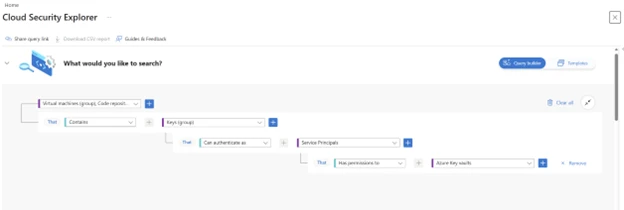
The security explorer templates library has been expanded with two additional queries that retrieve all container images with compromised software packages and all the running containers with these images.
Microsoft Sentinel
Microsoft Sentinel customers can use the TI Mapping analytics (a series of analytics all prefixed with ‘TI map’) to automatically match the malicious domain indicators mentioned in this blog post with data in their workspace. If the TI Map analytics are not currently deployed, customers can install the Threat Intelligence solution from the Microsoft Sentinel Content Hub to have the analytics rule deployed in their Sentinel workspace.
Indicators of compromise
| Indicator | Type | Description | First seen | Last seen |
| setup_bun.js | File name | Malicious script that installs the Bun runtime | November 24, 2025 | December 1, 2025 |
| bun_environment.js | File name | Script that facilitates credential gathering and exfiltration | November 24, 2025 | December 1, 2025 |
References
Learn more
For the latest security research from the Microsoft Threat Intelligence community, check out the Microsoft Threat Intelligence Blog.
To get notified about new publications and to join discussions on social media, follow us on LinkedIn, X (formerly Twitter), and Bluesky.
To hear stories and insights from the Microsoft Threat Intelligence community about the ever-evolving threat landscape, listen to the Microsoft Threat Intelligence podcast.
The post Shai-Hulud 2.0: Guidance for detecting, investigating, and defending against the supply chain attack appeared first on Microsoft Security Blog.
Source: Microsoft Security
